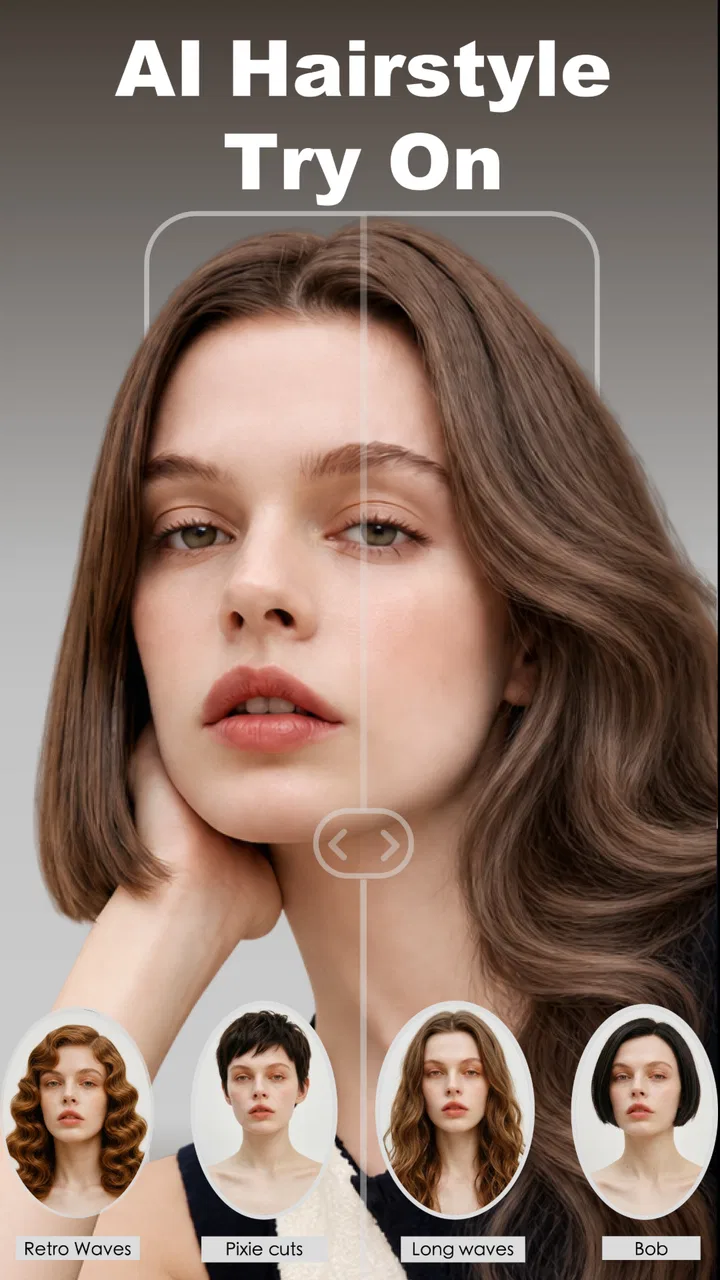
Hairstyle Try On-Color Changer
- 4.3
- Rating
- 10.00K
- Installs
- Free
- Price

 Analysis by App-foxy
I installed Hairstyle Try On-Color Changer expecting a quick beauty experiment, and that is exactly where it makes its strongest first impression. It lets me preview different hair directions without booking an appointment, buying dye, or relying entirely on imagination. The appeal is immediate: upload a suitable photo, explore a new look, and get a visual starting point for a conversation with a stylist or a personal decision.
What interested me more than the novelty was whether I would still open it after the first few playful tests. Beauty apps often feel exciting for a few minutes and then disappear from the phone. This one has a more practical chance of lasting because hair changes are recurring decisions, not one-time curiosities. Still, its lasting value depends heavily on how carefully you use the results and how much realism you expect from an AI preview.
From instant makeover to a useful planning tool
Hairstyle Try On-Color Changer is a free beauty app from Leshui Labs, aimed at people who want to visualize hairstyles and hair colors before making a real change. It is rated for Everyone, so the basic concept is easy to understand and broadly accessible. The current release is version 1.5.26, and it supports devices running Android 7.0 or later.
You May Also Like

 AccuWeather: Weather Radar
AccuWeather Review: A Quick, Clear Forecast for Everyday Decisions
For everyday plans, the best forecast is the one you can understand quickly. AccuWeather makes rain timing, radar, and local conditions easy to act on, with a few trade-offs.

 Hill Climb Racing
Why Hill Climb Racing Still Turns Crashes Into One More Run
A tiny car, a bumpy hill and one more upgrade: Hill Climb Racing keeps resurfacing because its simple chaos makes every near-miss feel personal.

 AliExpress - Shopping App
AliExpress Makes Global Shopping Feel Personal, but Shoppers Bear the Risk
AliExpress turns a global marketplace into a pocket-sized discovery engine. Its reach is useful, its shopping loop compelling, and its trade-offs easy to miss.

 Lords Mobile: Kingdom Wars
Lords Mobile Is a Kingdom-Building Routine, Not a Quick Match
A case-by-case verdict on the building, battles, device demands, and social commitments that make Lords Mobile rewarding for some players and exhausting for others.

 PDF Scanner app - TapScanner
TapScanner Makes Paperwork Easier to Capture, Check, and Share
TapScanner makes scanning with a phone feel less like a rescue operation and more like a dependable step in getting work done. Its capture tools are useful, though not flawless.

 Block Blast!
 Shows How Much a Puzzle Game Can Leave Out
A quiet grid game shows why puzzle players increasingly value instant clarity, repeatable skill and low-pressure play—and where the genre still needs to catch up.
More From Our News Desk
View All News


The app has attracted a 4.3 average from around 1.2 thousand ratings, with over 10 thousand installs. Those figures suggest a modest but real user base rather than an obscure experiment. I would describe it as a focused utility with a playful surface: the fun gets you started, while the useful part is comparing possibilities before you commit to scissors, bleach, or permanent color.
My first recommendation is to choose the photo more carefully than you might think. A straight-on image with the hair visible, even lighting, and minimal obstruction gives the app a much better foundation. Sunglasses, hats, heavy shadows, dramatic angles, and hair covering the face can make a preview less convincing. That is not a flaw unique to this app; AI hairstyle tools depend on the source image, and poor input can make even a good transformation look artificial.
I found the most productive approach was not to chase the most dramatic result first. I began with a color close to my current shade, then moved gradually toward warmer, cooler, lighter, or darker options. This created a useful reference point. If a subtle change already looked unconvincing, a more extreme transformation was unlikely to help me make a confident decision.
The first-week appeal comes from the speed of comparison. Instead of searching through separate image galleries for short hair, bangs, curls, or a new tone, I could keep the decision centered on my own face. That matters because a style that looks attractive on a model may not produce the same balance on another face, hairline, or complexion.
How I would use it before a salon visit
A realistic everyday scenario is preparing for a haircut appointment. I would take a few clear photos at home, test a conservative cut, a bolder cut, and several color families, then save the options that feel closest to my goal. The purpose is not to hand a stylist an exact blueprint. It is to make the conversation more precise: “shorter around the sides,” “warmer than this,” or “something with less visual weight around the forehead” is easier to explain when I can show a reference.
Another useful workflow is to compare maintenance levels rather than only appearance. A dramatic color may look exciting in a preview, but it can require more frequent touch-ups or a larger salon commitment in real life. A medium-length style or a softer color shift may be less striking on screen yet more realistic for someone who wants an uncomplicated routine. The app cannot make that lifestyle decision for me, but it helps expose the visual trade-off.
I also recommend taking screenshots or keeping a small personal set of favorites outside the moment of experimentation. AI previews are easy to forget, especially after trying many variations. A short list of serious candidates is more useful than a crowded collection of every amusing result. This is one of the simplest ways to turn a novelty session into something actionable.
Where the preview helps and where it should not lead
The app is best treated as a direction finder, not a promise. Hair texture, density, growth patterns, natural curl, existing damage, and the skill of the stylist all affect the final result. A generated image may suggest the feeling of a look without accurately showing how much cutting, styling, or color correction would be required.
This distinction becomes especially important with color. A screen preview can make a shade appear clean and even, while real hair may respond differently depending on its current color and chemical history. If I were considering a major lightening process, I would use the app to narrow my preferences, then ask a professional about the condition of my hair and the realistic path to that shade.
That limitation does not make the app pointless. It simply changes the question it can answer. It is good at helping me ask, “Which direction feels like me?” It is not reliable enough to answer, “What exact formula should be applied?” That boundary is crucial for avoiding disappointment.
Does it earn a place after the first month?
The month-to-month value is more conditional than the first-week excitement. Most people will not need a hairstyle preview every day, and I would not pretend this is an app that naturally becomes a daily habit. Its recurring value appears around real decision points: a seasonal refresh, a planned haircut, a change in work or school routine, a special event, or the desire to move away from a familiar look.
That occasional pattern is not necessarily a weakness. Some tools are valuable precisely because they are available when a decision arrives. I would rather open a focused hairstyle app before a costly change than make a rushed choice based on a vague mental picture. The key is to keep expectations realistic and return with a specific question instead of browsing without a goal.
For someone who regularly changes hair color, the app can support a personal comparison habit. I could photograph my current look, test a few nearby alternatives, and decide whether the next change should be warmer, cooler, darker, or lighter. That creates a simple visual record of preferences. It may also help prevent impulsive decisions by showing whether a new idea is genuinely appealing or merely exciting because it is different.
For someone who keeps the same haircut for years, the value is likely occasional rather than recurring. In that case, the free entry point is helpful: I can use it when curiosity or a real appointment appears without treating it as an essential subscription service. In-app purchases range from $0.99 to $49.99 per item, so I would pay attention before confirming anything and decide whether the extra value matches how often I expect to use the app.
The comparison with usual alternatives is straightforward. Searching images online gives me a broad library, but those examples usually show other people and different lighting. Asking a friend can provide honest taste, but friends may struggle to describe what would suit my face. A salon consultation offers professional judgment, yet it takes time and may happen after I have already formed an unclear idea. This app sits between those options: more personal than a gallery, faster than an appointment, but less authoritative than a trained stylist.
General photo editors can also change color or add effects, but they are often designed for polished images rather than a focused hairstyle decision. Hairstyle Try On-Color Changer is more useful when I want to compare hair-related possibilities without building the edit manually. The trade-off is that a specialized AI preview can feel less flexible than a full editor when I want precise control over every detail.
The maintenance burden is mostly human
Using the app itself is not the main maintenance challenge. The real burden is managing the gap between an attractive preview and a manageable real-world style. I found it helpful to judge every option with three questions: Would I like this after the initial excitement? Can I maintain it with my normal time and budget? What happens when the color fades or the cut grows out?
That last question is easy to ignore because the preview captures one finished moment. A short cut may look excellent at its ideal length but demand frequent shaping. A vivid color may create the strongest image but require more attention than a natural-looking tone. A high-contrast change can also make regrowth more visible. The app can show me the destination, but it does not replace planning for the journey between salon visits.
One advanced way to use the tool is to test a “maintenance version” of the look. Instead of choosing only the brightest or most dramatic option, I would compare it with a softer shade and a less structured cut. If both versions appeal to me, the lower-maintenance one may be the better long-term choice. This is a more valuable experiment than simply finding the most surprising transformation.
I would also avoid judging a style from one image alone. If possible, I would use several photos with different expressions and angles, because a look that works in one pose may not feel right in ordinary life. Even without treating the generated result as exact, variation can reveal whether I like the overall direction or only one flattering snapshot.
What can cause fatigue over time?
The biggest source of fatigue is repetition. Once I have tried the obvious blonde, brunette, red, short, long, straight, and curly ideas, the next sessions can become a loop of minor variations. That is when the app risks becoming a novelty drawer rather than a decision aid. I would avoid opening it simply to scroll through possibilities and instead return only when I have a real change in mind.
Another source of fatigue is inconsistency between the image and the person. AI transformations can be persuasive at a glance but less convincing when I inspect the hairline, edges, texture, or relationship between the hairstyle and the face. If a result looks strange, I would not immediately conclude that the style is wrong. The photo may be unsuitable, or the transformation may be asking the app to make a larger change than the image can support.
There is also an emotional risk in testing too many dramatic looks. Endless comparison can make a perfectly good current hairstyle feel inadequate. I think the healthiest use is exploratory but bounded: choose a few realistic candidates, note what you like about each, and stop once the app has helped you make the next decision. More options are not always more useful.
People who need professional-level consultation should skip relying on this app alone. If the decision involves correcting damaged color, managing thinning hair, accommodating a medical condition, or planning a technically demanding cut, a qualified stylist is the better primary resource. The app may still help communicate a preference, but it should not be the authority.
I would also be cautious if I dislike experimenting with photos or prefer exact control. Someone looking for detailed editing tools, precise color sampling, or a full beauty retouching suite may find a general photo editor more suitable. This app’s strength is its focused, fast visual suggestion, not comprehensive manual design.
My long-term verdict
After the novelty fades, Hairstyle Try On-Color Changer remains useful when I give it a job. That job is not to entertain me indefinitely or guarantee a salon result. It is to reduce uncertainty before I change my hair. Used with clear photos, a short list of realistic options, and a willingness to discuss the result with a professional, it can turn a vague idea into a more practical plan.
I especially like its value for people who hesitate before making visible changes. Seeing a version of my own face with a different cut or color can reveal whether I am attracted to the style itself or merely to the model wearing it. That small reduction in uncertainty may prevent an expensive impulse and make a salon conversation much easier.
The free price makes it approachable, while the Everyone rating keeps the concept broadly accessible. The presence of optional purchases means I would review each purchase carefully rather than assuming every part of the experience is included. For occasional users, the app is easiest to justify when the free experience already answers the immediate question; frequent users should decide whether paid items genuinely improve their planning routine.
My honest recommendation is to keep it as an occasional planning tool, not a permanent daily habit. It earns space on my phone if I am considering a haircut, a new shade, or a change in personal style. It does not earn that space for someone expecting exact salon simulation, professional hair advice, or endless fresh entertainment.
In the end, the app succeeds when it helps me make a calmer real-world choice. I would open it before an appointment, test a few options, compare the exciting version with the maintainable version, and bring the most useful references to a stylist. That is enough recurring value for me: not constant use, but dependable help at the moments when a hairstyle decision matters.
FAQs for Hairstyle Try On-Color Changer
01What is Hairstyle Try On-Color Changer, and how does it work?
Hairstyle Try On-Color Changer is a virtual makeover app that lets you preview different hairstyles and hair colors using a photo. After selecting or taking a picture, you can apply available cuts, lengths, styles, and shades to see how they may look on you. The result is intended as a visual guide rather than an exact prediction of a salon appointment.
02Can I use my own photo, or does the app provide models to try hairstyles on?
The app generally allows users to work with a personal photo, either by taking a new picture or choosing one from the device gallery. For the most convincing preview, use a clear, front-facing image with good lighting and your hair and face fully visible. Depending on the version, sample images or model templates may also be available for experimenting before uploading a personal photo.
03Does Hairstyle Try On-Color Changer show realistic hair colors and hairstyles?
The app can provide a useful approximation of how different cuts and colors might appear, especially when the uploaded image is well lit and properly aligned. However, virtual overlays may not perfectly reproduce texture, volume, curls, highlights, or the way a particular shade reacts to your natural hair. Treat the previews as inspiration and discuss the final choice with a professional stylist.
04Is Hairstyle Try On-Color Changer free to download and use?
The application may be available to download at no initial cost, but some hairstyles, color options, editing tools, or advanced features can be restricted behind advertisements, in-app purchases, or a subscription. Pricing and available features may vary by platform and region. Before confirming a trial or purchase, review the app-store listing carefully, including renewal terms and cancellation instructions.
05Does the app require internet access, and is my photo kept private?
Basic browsing or editing functions may work differently depending on the app version, while certain effects, advertisements, cloud processing, or premium content may require an internet connection. Because photo handling can vary, check the current privacy policy and requested permissions before uploading personal images. Avoid using sensitive photographs, and verify whether images are stored, processed remotely, or deleted after editing.
Pros
- Lets you preview haircuts and colors before visiting a salon.
- Offers quick comparisons between different styles and shades.
- Useful for exploring bold looks without making a permanent change.
- Simple interface makes basic edits easy for most users.
- Can provide inspiration when choosing a new hairstyle.
Cons
- Results may look unrealistic with poor lighting or unclear photos.
- Some styles or color options may require in-app purchases.
- Hair detection can struggle with curls
- hats
- or messy backgrounds.
- Virtual colors may differ noticeably from real salon results.
- Advanced editing controls may feel limited for precise adjustments.

Hairstyle Try On-Color Changer
Gallery